
Content management systems
Content Management Systems (CMS) facilitate creating, managing, and modifying digital content. They enable non-technical users to maintain websites without coding knowledge.
In the era of digital dominance, Content Management Systems have become the cornerstone of website development and maintenance. They offer intuitive interfaces and tools that allow individuals and businesses to publish content online seamlessly.
With a CMS, users can collaborate on content creation, schedule publishing, and handle various multimedia elements all in one place. This simplifies the process of updating web pages, ensuring that websites remain current and attractive to search engines and visitors alike.
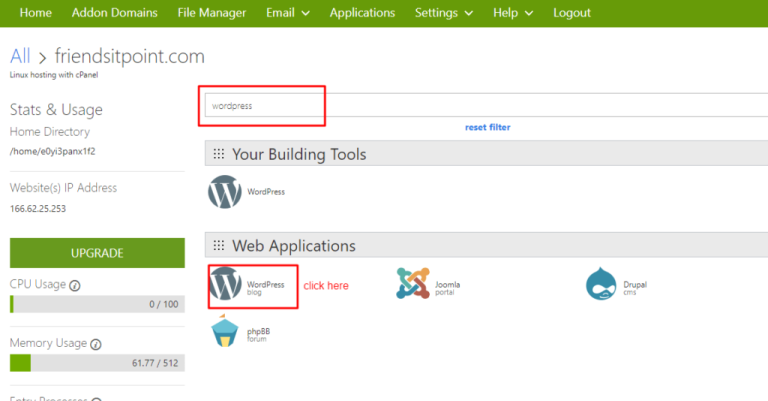
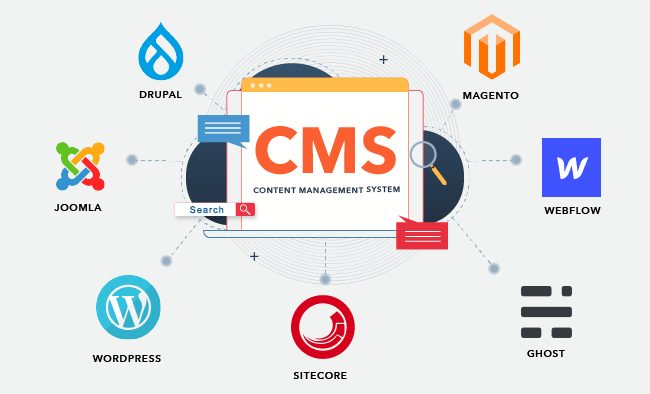
The popularity of platforms such as WordPress, Joomla, and Drupal underscores the demand for user-friendly web content solutions.
By providing templates and plugins, CMS platforms reduce the need for extensive web design expertise, making the internet more accessible for content creators of all skill levels.
Before reading this blog post see our previous blog post about CMS Platforms Guide. CMS platforms are tools for managing digital content and websites.
Credit: solidwp.com
What Is A Content Management System
A Content Management System (CMS) is software that helps create, manage, and modify website content without the need for specialized technical knowledge.
Easy to use by anyone, not just web developers. Users can publish articles, manage pages, and upload multimedia using a CMS. Key Features of a CMS include:
- User-Friendly Editor: Edit content like using a word processor.
- Design Flexibility: Choose and customize templates.
- Access Control: Decide who can edit or publish content.
- SEO Tools: Improve website ranking easily.
- Content Scheduling: Set times for content to go live.
Credit: blog.hubspot.com
Types Of Content Management Systems
Diving into Content Management Systems, various types exist. Self-hosted CMS solutions require a server for setup, giving full control to the user. Users manage updates and security. Cloud-based CMS, on the other hand, resides on the provider’s servers.
They offer ease of access from any location. Open-source CMS platforms are widely popular. They are free to download and customize.
A large community often supports these systems. Proprietary CMS are the opposite. Only the owning company can alter these systems. They might come with dedicated support.
| Type | Hosting | Cost | Customization |
|---|---|---|---|
| Self-hosted | Personal Server | Varies | High |
| Cloud-based | Provider’s Server | Subscription | Low to Medium |
| Open-source | Choice of Server | Free | High |
| Proprietary | Provider’s Server | License Fee | Restricted |
Benefits Of Using A Content Management System
Content Management Systems (CMS) provide powerful advantages for website creation and management. Utilizing a CMS leads to streamlined content creation, simplifying the process of building and updating website content.
By offering a user-friendly interface, content can be added and edited without specialized technical knowledge. Ease of website management is another key benefit.
With intuitive dashboards and tools, users can oversee their site’s structure and elements efficiently. Such systems often include improved collaboration features.
They allow multiple users to work on content simultaneously, supporting team interaction and productivity. Publishing content becomes more efficient as well. A few clicks can make new articles or updates go live instantly.
Enhanced scalability and flexibility are inherent in many CMS platforms, enabling websites to grow and adapt over time to new business needs and customer demands without the need for complete redesigns.
Popular Content Management Systems
WordPress dominates the web as a top choice for content management. It’s user-friendly and perfect for blogging and business websites. Strengths of WordPress include easy customization with plugins and themes. It also has a large community for support.
| Platform | Usage Scenario | Known For |
|---|---|---|
| Drupal | Complex, versatile web projects | Robust security |
| Joomla | Content-heavy sites, e-commerce | Balanced user-friendliness and power |
| Magento | E-commerce stores | Advanced features for online sales |
| Shopify | Online retail businesses | Complete e-commerce solution |
Each CMS has unique features, making them suitable for different needs. Users choose based on their own goals and skills. Flexibility, security, and community support are key to a great CMS.
Factors To Consider When Choosing A Cms
Scalability is crucial for a CMS to grow with your business needs. Flexibility allows for quick changes without hassle. The user-friendliness of a CMS ensures it is easy to use. It helps in managing content without technical help.
Look at the customization options. They should meet the specific requirements of your business. The CMS must allow for a tailored user experience. SEO capabilities are a must for better online visibility.
They help in optimizing content for search engines effectively. Security is non-negotiable to protect your site from threats.
A secure CMS keeps customer data safe. The strength of support and community indicates reliability. A strong community offers assistance and improves the CMS over time.
Best Practices For Implementing A Content Management System
To ensure success with your CMS, setting clear goals and objectives is critical. Goals guide your implementation, shaping the CMS to meet your specific needs. Deep research on various systems pinpoints the best options.
Choosing the right CMS becomes easier with well-defined requirements. A tailored CMS can greatly enhance your workflow. Crafting a content migration plan is essential for a smooth transition.
This plan prevents data loss and maintains content structure. User training is pivotal; it empowers your team to use the CMS effectively.
Post-launch, regular updates and maintenance keep the system running smoothly. This action prevents potential security issues and ensures the CMS evolves with your needs.
Challenges Of Using A Content Management System
Content Management Systems (CMS) bring powerful tools to websites. They are not always easy to use. A common challenge is the steep learning curve.
Users may need time to become skilled. Another issue is the security risks. Systems can be targets for hackers. Customizing your site can be hard, too.
Many CMS have limited ways to change things. It might not look or work how you want. Also, connecting CMS with other programs can cause headaches. Integration issues are a real problem. This could mean extra work to share data or add features.
Future Trends In Content Management Systems
The digital world is always changing. Headless CMS is getting popular. It separates content from design. This means you can send content to any device.
It is like water fitting into different-shaped glasses. Artificial Intelligence makes CMS smarter. It can help make content suggestions. AI helps to sort out large amounts of data, too.
Mobile-first is a must-have now. Many people surf the web on phones. CMSs are adapting to this change.
They are becoming more mobile-friendly. People are starting to talk to machines. Voice-activated CMS is on the rise. We can tell a CMS what to do using voice commands.
Credit: kinsta.com
Frequently Asked Questions For Content Management Systems
What Is A Content Management System (CMS)?
A Content Management System (CMS) is software that helps users create, manage, and modify content on a website without needing specialized technical knowledge. It provides a user-friendly interface for organizing and publishing web content.
How Does A CMS Benefit My Website?
A CMS streamlines the web content creation process, allowing for quick updates and collaboration without the need for coding. This improves efficiency and enables non-technical users to maintain an up-to-date online presence easily.
Can A Cms Improve Seo Performance?
Yes, a CMS can significantly enhance SEO by facilitating content optimization, mobile responsiveness, and faster loading times. Many systems also offer built-in SEO tools that assist in improving your site’s visibility in search engine results.
What Are Popular Cms Platforms?
Popular CMS platforms include WordPress, Joomla, Drupal, and Shopify. Each has distinct features catering to different needs, ranging from blogging to e-commerce, providing versatility for website owners.
Conclusion
Navigating the landscape of content management systems can be daunting. Yet, choosing the right CMS empowers your digital presence.
It streamlines content creation and maintenance while enhancing user engagement. Reflect on your unique needs and make an informed decision to harness the full potential of content management.
Embrace innovation and stay ahead in the digital game.