
Transforming Your WordPress Site from Subdomain to Main Domain
Effortlessly move your WordPress site from Subdomain to Main Domain, preserving SEO. Follow expert steps for a smooth transition!
To switch a website from a Subdomain to a Main Domain, download and save all files from the WordPress root folder, navigate to the domain root folder (public_html), and save the files there. Finally, update the URL settings and clean the cache.
Are you looking to switch your website from a subdomain to the main website? In this guide, we will walk you through the process step by step. By following these instructions, you can seamlessly migrate your website to the main domain, ensuring a smooth transition and preserving your SEO rankings. So, let’s dive in and learn how to make this switch efficiently and effectively.
In the vast landscape of the internet, creating a subdomain can be a valuable skill for anyone managing a website.
Migrating Website From Subdomain To Root Domain
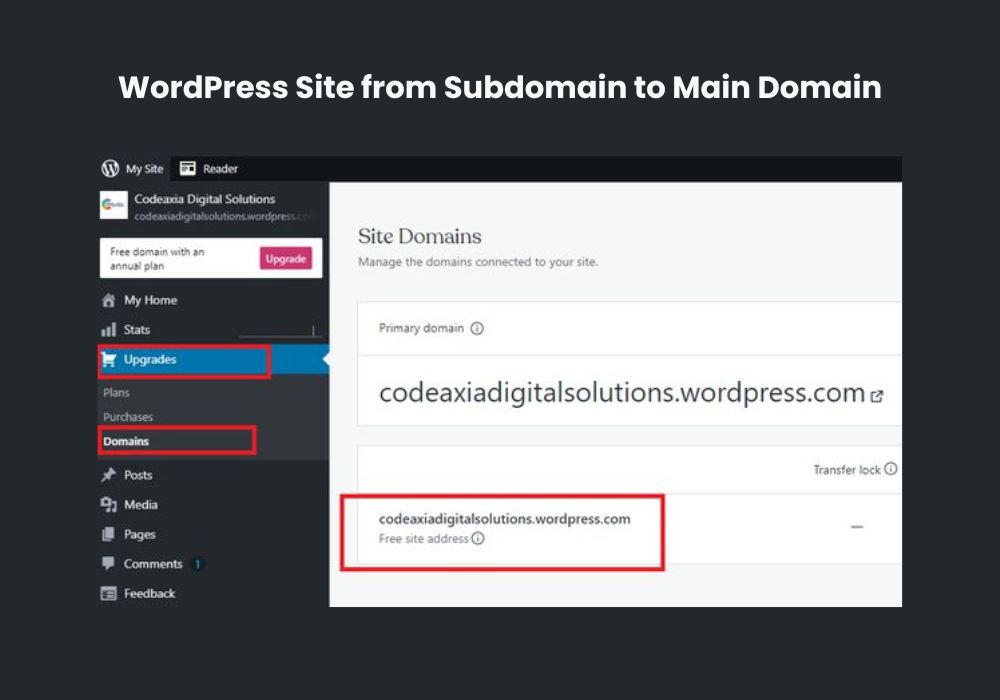
To migrate a website from a subdomain to the main domain, you need to follow a step-by-step process:
- Using Manual Backups for Migrating the Website: Create a backup of your website files and database to ensure you have a copy of all the data.
- Installation of the Plugin for Website Migration: Install a migration plugin like Duplicator to simplify the process.
- Performing Name Checks for a Smooth Migration: Check the URLs and paths of your website’s files and make sure they are correct.
- Creation of a New Database for the Root Domain: Create a new database for your website on the root domain.
- Using Cpanel for Moving the Website: Use Cpanel to move your website files from the subdomain to the root domain.
- Implementing Maintenance Mode during the Migration Process: Enable maintenance mode on your website to prevent visitors from accessing it while you perform the migration.
- Installing the Duplicator File Installer for Website Migration: Use the Duplicator File Installer to migrate your website to the root domain.
How To Move WordPress From Subdomain To Root Domain
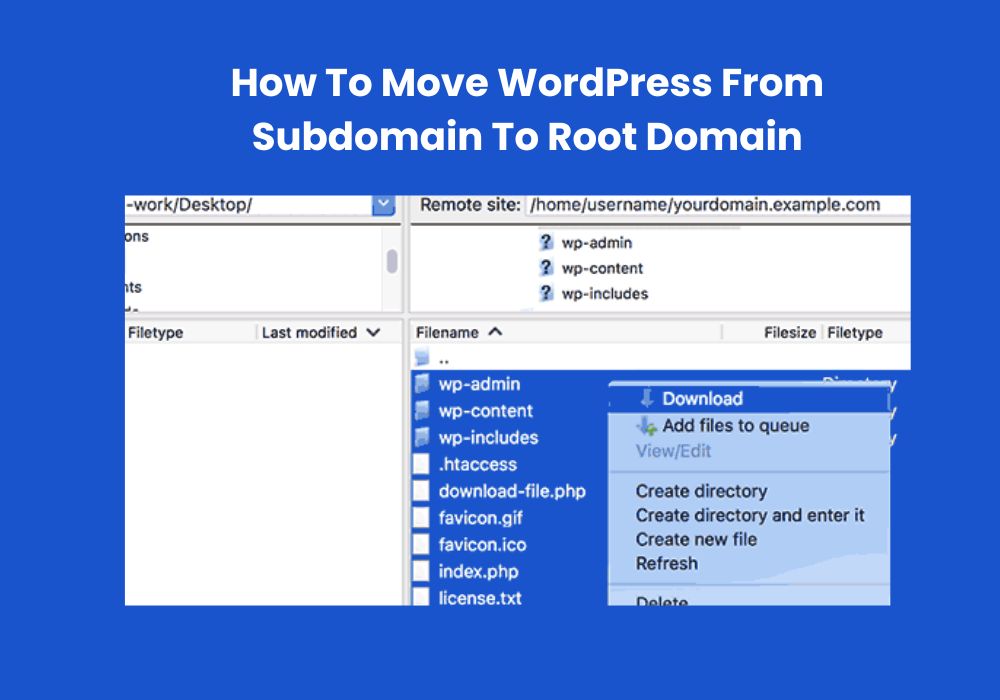
When it comes to switching a website from a subdomain to the main website, it’s important to follow a step-by-step process.
- Overview of Moving WordPress Subdomain to Root Domain: Before starting the migration process, it’s essential to back up the website to ensure that no data is lost during the transfer. Once the backup is complete, clean the public_html directory to remove any unnecessary files that may hinder the migration.
- Implementing Maintenance Mode: To avoid any disruption to the user experience, it’s recommended to implement maintenance mode during the migration process. This ensures that visitors see a notification about the temporary unavailability of the website.
- Copying WordPress Files: Next, copy all WordPress files from the subdomain to the root folder of the main website. This includes the theme, plugins, and media files.
- Changing URL Settings: After copying the files, update the URL settings for the website to reflect the new domain. This includes changing the WordPress address and site address.
- Updating URLs: To ensure all links within the website are correctly redirected, update the URLs for the migration process. This includes updating internal and external links.
- Redirecting Subdomain Traffic: Once the migration process is complete, set up a redirect to ensure that all subdomain traffic is redirected to the new root domain.
- Clearing Cache: Finally, clear the cache after the migration process to ensure that users see the updated website without any cached data from the previous subdomain.
How To Transfer WordPress Website From Subdomain To Main Domain
When it comes to switching your website from a subdomain to a main domain, you need to follow a few steps. Firstly, navigate to your WordPress root folder and download all the files and folders to your local computer. Then, go to your domain root folder, which is usually called public_html. Save and close the cPanel File Manager editor.
If you want to move your WordPress site from a subdirectory to the root, you can double-click on the subdirectory containing the WordPress files, select all the files, and then move them. In case you need to change your WordPress subdomain, you can open your File Manager, rename the folder of your WordPress site with the name of the new subdomain, and save it.
You can also redirect a subdomain to another server using the Plesk Forwarding hosting type. These steps will help you successfully transfer your WordPress website from a subdomain to the main domain.
How To Change Subdomain to Main Domain
To switch your website from a subdomain to your main website in WordPress, there are a few steps you need to follow:
- Open the File Manager in the Files & Security Tile.
- Rename the WordPress site folder to the new subdomain name.
- Redirect the subdomain to the main website.
To begin, open the File Manager in your hosting account and navigate to the Files & Security Tile. From there, you can find your WordPress site folder and rename it to the new subdomain name. This ensures that your website will be located in the correct directory when you make the switch. Finally, you’ll need to set up a redirect from the subdomain to the main website to ensure that visitors are automatically directed to the correct URL.
By following these steps, you can successfully switch your website from a subdomain to your main website in WordPress.
Conclusion
To successfully switch your website from a Subdomain to a Main Domain, follow the steps outlined in this blog post. Remember to carefully download and transfer all your website files to the appropriate root folder. Additionally, ensure that you update your URL settings and clean the cache for a seamless transition.
By following these steps, you can maintain your website’s SEO value and ensure a smooth user experience for your visitors. Don’t forget to make a backup of your website before making any changes for added security.